
What is a Headless CMS?
Content now has to show up in more places than a single website, including apps, kiosks, voice assistants, AI chat bots and whatever channel comes next. A headless content management system (CMS) is how many teams are handling that shift.
This guide covers how a headless CMS actually works, how it compares to traditional and decoupled systems, when it makes sense to use one, and what to look for when choosing a platform.
What Is a Headless CMS?
A headless CMS is a content management system in which the presentation layer or front end, referred to as the "head,” is separated from the content repository layer or back end, known as the "body."
Unlike a traditional CMS, such as WordPress, where the frontend and backend are tightly coupled and deliver content to a single channel, a headless CMS stores content in a central repository and exposes it through an API rather than rendering it into HTML. The word “headless” refers to the missing “head,” the part of a typical CMS that decides how content looks on a page.
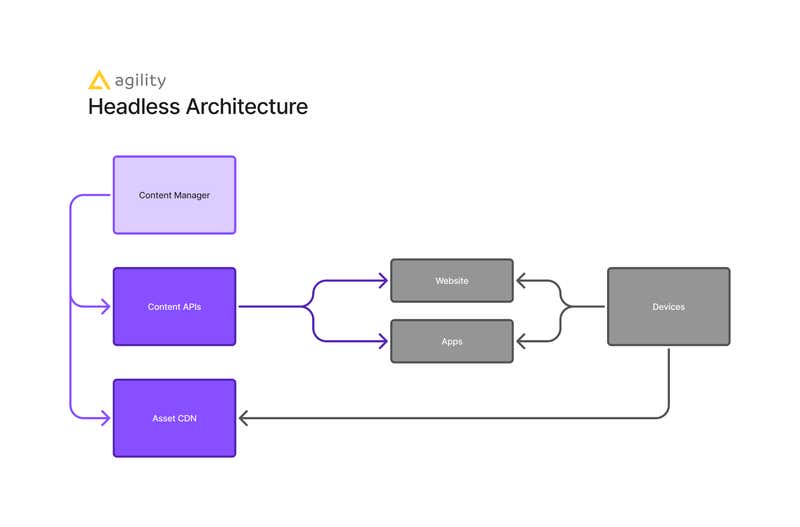
Practically, this means the team that writes and manages content can work separately from the team that builds the front end. An editor updates a product description once, and that single update can then appear on a website, inside a mobile app, on a screen in a retail location, or through any other channel connected to the same API, without anyone touching front-end code.
This is also why a headless CMS is sometimes called Content-as-a-Service. It treats content less like a page and more like structured data that any application can request and use.
For example, for an education company using a headless CMS, it could look like this:
-
Body (back-end): A content hub in the cloud where a team of creators collaborates to develop and manage a series of educational tutorials.
-
Head (Front-end): Content presented in various forms:
-
A responsive website where users can watch the tutorials
-
A mobile app that offers offline viewing and interactive quizzes
-
A smart TV app that provides a lean-back type of experience
-
An AI chatbot that answers questions and provides interactive feedback about the tutorials
This allows the content creators to focus on producing high-quality video tutorials without thinking about how they'll be displayed. Meanwhile, the development team builds a custom frontend for each channel using their preferred frameworks, such as Next.js, React, and others.
How a Headless CMS Works
A headless CMS stores content in a structured format and delivers it via an API, leaving design, hosting, and rendering entirely to the channel consuming it. Here's what that looks like in Agility CMS.
-
Content model and storage: Content is defined as a content model, a set of fields like name, description, and price, then stored in Shared Content, a central library any channel can reference by name.
-
Delivery: The Content Fetch API returns that content as structured data, not HTML. Developers pull it into whatever framework fits the project, Next.js, React, Vue, using Agility's SDKs, and choose how it renders, server-side, static, or a hybrid.
-
Hosting: Agility manages the content layer and API in the cloud. The front end deploys separately, on Netlify, Vercel, or wherever it fits, and scales independently of the content layer.
-
Pages: Templates and modules let developers define page structure once, so editors can assemble and publish new pages without touching code.
For example, when Oxford Properties moved to a headless setup, it changed how the team worked day to day.
By modeling property listings as structured content rather than individual web pages, the team could add and manage listings across hundreds of thousands of properties through a single consistent content model, rather than building each listing as a one-off page. The same API layer enabled property data to power public listings and internal tools from a single source, rather than maintaining separate content for each.
A Brief History: Why the Headless CMS Was Created
Headless CMS technology emerged to accomplish something that traditional content management systems weren’t built to do. Traditional CMSs were built for a simpler web where a business had a single website and content only needed to look right in a browser.
That stopped being enough as mobile apps, digital signage, IoT devices, and eventually voice assistants and AI interfaces became normal places for content to live. A traditional CMS, with content and presentation tightly fused, had no clean way to serve all those channels from a single source, so every new channel meant developers had to create time-consuming workarounds, or, in many cases, companies needed multiple CMSs.
Headless architecture solved this by treating content as something to be delivered rather than rendered. Once content lives in a central repository and is delivered to every channel via an API, adding a new channel no longer requires rebuilding how content is stored and managed. It just means building a new way to consume the same API.
Why Headless CMS Matters Now
Headless adoption isn't a niche choice anymore. According to Mordor Intelligence, headless platforms are growing at an 18.85% compound annual rate through 2031, more than double the 7.68% pace of the CMS market overall, as enterprises replace monolithic systems with composable platforms that separate content from presentation.
Enterprises with multiple digital properties, mobile apps, or channels beyond a single website are moving toward headless architecture because a traditional CMS can't keep up with the growing number of places content now needs to live.
Also, another part of what's accelerating it is artificial intelligence, as AI-driven tools for personalized recommendations and dynamic content adaptation assume that content is structured and API-accessible, which traditional systems weren't built for.
Headless CMS vs. Traditional CMS
While traditional content management systems have served businesses well in the past, their limitations are becoming ever more apparent in a market that increasingly requires content to be agile and easily transferable across platforms.
A small business with a single website and no plans to expand into other channels may never need to go headless at all. But once content needs to live in more than one place, a headless CMS can remove a lot of headaches.
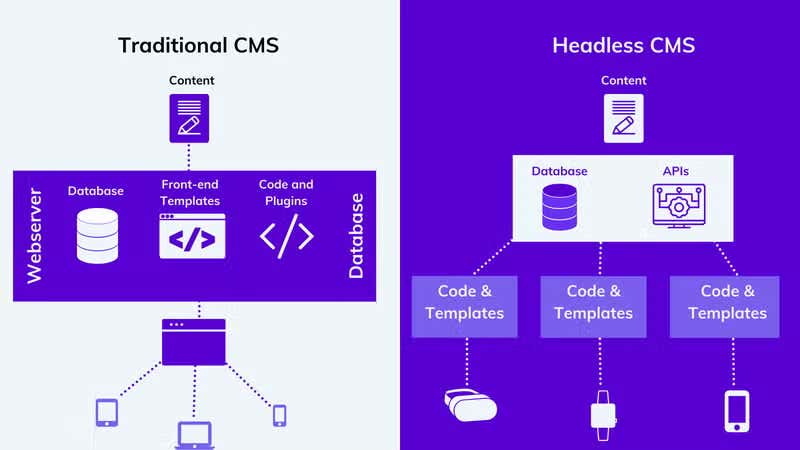
WordPress and Drupal are common examples of traditional CMS platforms, built to manage a single website rather than multiple channels. Content and the code that displays it live in the same system, which keeps setup simple, but can create severe limitations when a business needs to publish elsewhere. A headless CMS separates those two layers intentionally, trading some of that simplicity for the ability to reach any channel from a single content source.
|
Traditional CMS |
Headless CMS |
|
|
Content and presentation |
Combined in one system |
Separated, content delivered via API |
|
Hosting |
Self-managed infrastructure, content and front end deployed together, whether on-prem or cloud |
Typically vendor-managed SaaS, front end hosted separately, often on its own cloud or edge platform |
|
Scalability |
Scaling means adding capacity to one system handling both content and delivery |
Content API scales on the vendor's infrastructure, independent of how the front end scales |
|
Supported channels |
Primarily one website |
Any channel that can call an API, web, mobile, IoT, kiosks, voice |
|
Design flexibility |
Constrained by the CMS's themes and templating system |
Front end built independently, no CMS-imposed design constraints |
|
Security |
One system exposed to the public, a vulnerability in the CMS or a plugin can expose the whole site |
Smaller public attack surface, though more integration points to secure overall |
|
Maintenance |
Team is responsible for patching and updating the full system, back end and front end together |
Vendor handles back-end patching and infrastructure; team maintains the front end it built |
|
Developer experience |
Development happens within the CMS's own templating language and conventions |
Developers work with standard APIs and whatever modern framework fits the project |
|
Editor independence |
Editors often need developer help for structural changes |
Developers build the front end once; editors manage content independently after |
Headless CMS vs Decoupled CMS
Headless and decoupled are often used interchangeably, but they're not quite the same thing.
A headless CMS has no front end. It delivers content via an API and leaves every decision about how that content is displayed to the application that requests it.
A decoupled CMS also separates content management from the front end, but it still ships with a default front end, one you can customize, but that stays built on the CMS's own templates.
Agility CMS is a useful example of how blurry this line can get. It's built headless-first, delivering content entirely through APIs. Still, it also offers an optional visual page-management layer, so a team can run it purely headless or lean on the built-in front-end tools when that's the better fit for a given project. That flexibility sits atop a content-first approach, where content modeling, reusable content modules, and scheduling are built to keep content creators and marketers working directly with content, whether or not a team ends up using the visual layer.
The distinction between headless and decoupled architecture matters most during a platform evaluation. A developer-focused team that wants complete control over every front-end and is prepared to build each one is looking for headless architecture. A team that wants the option of a built-in front end for some projects, while still being able to break away from it for others, is looking at decoupled architecture instead.
Both approaches solve the same underlying problem, a traditional CMS's content and presentation being too tightly bound together. They solve it with a different amount of built-in front-end support.
Benefits of a Headless CMS
The benefits of going headless look different depending on which part of the organization is asking.
For Business Leadership
A headless CMS reduces the cost of adding a new channel. Instead of rebuilding content management for every new app, device, or platform, the same content and the same team support them all. That shows up as:
-
Faster Time to Market: Frontend and backend teams work independently, accelerating development cycles.
-
Cleaner, More Scalable Architecture: A content-first approach avoids the fragile sprawl that comes with bolting new channels onto a monolithic CMS.
-
Future-Proofing: New technologies and channels integrate without re-architecting the whole system.
-
Reduced, Centralized Security Risk: A decoupled architecture reduces the attack surface and enables consistent security management in the backend.
For Developers
Developers get to choose their own tools. Because the CMS only delivers content via an API, front-end teams can build with whatever framework fits the project, rather than being locked into a templating system the CMS ships with. That includes:
-
Flexible Frontend Choices: Build with any frontend technology and focus on the experience, not on wrestling with the CMS's own front-end complexity.
-
No Fixed Structure: Connect with existing systems in whatever language or framework fits, without CMS-imposed constraints.
-
Hosting Flexibility: Host content anywhere, including static site generators.
-
Independent Frontend Security: Each front-end can implement its own security protocols.
For Marketers and Editors
Content gets created once and reused everywhere it's needed, rather than rebuilt for each channel. A well-modeled headless setup also means editors can manage content independently, without waiting on a developer for routine updates, once the initial structure is in place. Many teams pair this with personalization tools that use the same structured content to tailor what each visitor sees. This gives editors:
-
Content Reusability: The same content powers every channel without duplication.
-
Content Management Focus: Manage content without worrying about how or where it's delivered.
-
Editor Independence: Update and publish content without waiting on developer availability.
For End Users
None of the above matters if the result isn't better, and it usually is. Load times tend to improve, since the front end isn't waiting on a monolithic system to assemble a page, and the experience holds up more consistently across whatever device or channel someone happens to be using.
Real World Applications of Headless CMS Technology
The benefits of a headless CMS show up across a wide range of industries and use cases. Every organization below is an Agility customer, backed by the same hands-on, dedicated support and perfect-fit guarantee that every Agility client receives, regardless of their team or ecosystem size.
-
SCENE's rewards program used a headless setup to support 1.6 million daily page views alongside a mobile app with 90,000 installs, all from a single content source.
-
Culver's modernized its digital menu on a headless architecture, cutting page load times by half and driving a 26% increase in online orders.
-
Oxford Properties used a headless content model to manage listings across 500,000 properties, improving workflow efficiency 70x compared to their previous system.
-
The Canadian Opera Company moved to a headless setup to keep content updates fast and reliable during a period when digital was its primary way of reaching audiences.
-
Cineplex handles more than 500 million page views a year on a headless architecture, with faster load times and a mobile experience that holds up under that volume.
Headless CMS and SEO
Architecture affects SEO more than it might seem. How a headless setup renders pages, server-side, statically, or through client-side JavaScript, has a direct effect on whether search engines can crawl and index content properly, and page speed and structured data both become the front end's responsibility rather than the CMS's. Handled well, a headless setup can perform very well in search. Handled carelessly, particularly with client-side-only rendering, it can create real visibility problems.
For the full breakdown, including Core Web Vitals and structured data, see Are Headless CMS Good for SEO?. For a platform-by-platform comparison, see Best CMS for SEO.
Headless CMS and AI Search (AEO/GEO)
The same structure that helps search engines also helps AI systems. Tools like AI Overviews, ChatGPT, and Perplexity pull from sources with clear, well-structured answers, and structured content is easier for them to extract accurately than a page built as one block of unstructured HTML.
A clean content model and an open API matter more to how AI systems use a site's content than the size of a vendor's sales team. For more on structured content and AI discoverability, see our guide on Headless CMS for AEO.
When and Who Should Use a Headless CMS
A headless CMS tends to make the most sense in a few recurring situations, particularly when building a native mobile app alongside a website, or working with modern JavaScript frameworks and static site generators.
It also fits well when building a composable tech stack out of best-of-breed tools rather than a single all-in-one platform, or when managing content across enough channels that a traditional CMS has started to feel like a bottleneck. That tends to work well for a few types of organizations, including:
-
Enterprises managing complex, multi-channel ecosystems
-
Digital agencies building custom sites for varied clients
-
Organizations delivering content to IoT or connected devices
-
Content teams that need to plan and publish across channels independently of development cycles.
Challenges with Headless CMS (And How Agility CMS Addresses Them)
Editors Depend on Developers for Routine Changes
Without a built-in front end, content updates can bottleneck on developer availability for changes a marketer should be able to make alone, and without a presentation layer, it's often hard for editors to preview exactly how content will look before it's published.
Agility solves this by giving editors Web Studio, a visual, WYSIWYG interface for creating and managing content exactly as it will appear on the live site, without needing a developer to build a custom preview for every change.
APIs and Modern Frameworks Have a Real Learning Curve
Working with APIs and frontend frameworks isn't something every team already knows, and that curve typically falls entirely on developers.
With Agility, developers work with standard REST and GraphQL APIs and whatever framework they already use, rather than learning a proprietary system. Editors, meanwhile, work entirely within Web Studio and never touch the API, so the learning curve stays with the team that actually needs it.
Security Responsibility Is Split Across More Layers
With content, APIs, and the front end no longer living in a single system, security has to be planned deliberately rather than inherited from a single, self-contained platform.
To handle this, Agility builds enterprise-grade security directly into the platform, covering the content layer and APIs so teams aren't left to secure every layer from scratch.
Choosing a Headless CMS: A Quick Checklist
A few criteria are worth evaluating regardless of which platform ends up being the right fit.
-
Content modeling flexibility: Look for whether it can represent content the way your team actually thinks about it, not just the way the vendor's demo does.
-
Integrations: Check whether it connects cleanly with the tools already in place, rather than requiring custom work for the basics.
-
Localization: If content needs to exist in more than one language or region, confirm that it's a first-class feature and not an afterthought.
-
Scalability: Ensure the front end and back end scale independently as traffic or content volume increases.
-
Editor experience: Confirm non-technical users can manage day-to-day content without filing a ticket for every small change.
-
Support: Ask what happens when something breaks, and who's actually reachable when it does.
If you're already comparing platforms, our CMS comparison hub provides more detail on each platform. There's no single best headless CMS. Different platforms suit different teams, and the right one depends more on how your team works and what you're building than on rankings or feature counts.
See our Headless CMS Comparison Hub.
Build Digital Experiences for the Present and the Future with a Headless CMS
Going headless is ultimately a bet on flexibility. Content that's structured once and delivered everywhere it's needed holds up better as new channels, devices, and interfaces keep popping up, unlike content locked into a single system's templates.
Agility CMS is a headless content management platform built for teams that need that flexibility without giving up an easy editing experience. It combines full API-first architecture with the visual page management covered above. Hence, developers get the control a headless setup promises while editors can still manage day-to-day content without filing a ticket for every change.
If you're evaluating platforms, talk to our team to see how Agility fits alongside whatever else you're considering.
FAQs About Headless CMS
-
What is the difference between a headless CMS and a traditional CMS?
A traditional CMS manages content and presentation in a single system, which keeps things simple until you need to publish to more than one channel. A headless CMS separates the two, storing content centrally and delivering it through an API to as many channels as needed, at the cost of requiring a separate front end for each channel.
-
What is the difference between a headless CMS and a decoupled CMS?
A headless CMS has no front end at all; all presentation decisions are made outside the system. A decoupled CMS separates content and presentation, but ships with a default front end that a team can use, modify, or bypass.
-
Can non-developers use a headless CMS?
Yes, though it depends on the platform. Many headless CMSs are built with a visual interface that lets editors create and manage content without touching code, even though developers build the front end itself.
-
Is a headless CMS more secure than a traditional CMS?
Generally, yes, though it depends on implementation. Separating content management from the public-facing front end reduces the number of ways an attacker can reach the content system directly, and each layer's security can be managed independently.
5. How does a headless CMS support omnichannel delivery?
Because content is delivered through an API rather than rendered directly into a webpage, the same content can be requested by a website, a mobile app, a kiosk, or any other connected channel, all from a single source.
6. What does implementing a headless CMS typically cost?
Costs vary by platform and scope, and usually include the platform subscription plus the cost of building the front end that will consume it. That upfront development cost is often offset over time by avoiding the need to rebuild content management for every new channel.
7. Can I migrate from a traditional CMS to a headless one?
Yes. The process involves remodeling existing content to fit the new system's content models, building the front-end to display it, and cutting over once both are ready.
8. Does a headless CMS support SEO?
Yes, when implemented well. Because rendering becomes the front end's responsibility, SEO outcomes depend heavily on how that front end is built, not just on the CMS itself. See the SEO section above.
9. What frontend technologies can I use with a headless CMS?
Any of them. Because content is delivered through a standard API, teams can build with React, Vue, Angular, or any other framework, and switch frameworks later without needing to migrate the content itself.
10. Is a headless CMS suitable for small businesses?
It can be, but it isn't always necessary. The benefits of headless architecture are clearest once a business is managing more than one channel; a single small website with no near-term plans to expand may get more value from a simpler platform.
11. How does AI integration work with a headless CMS?
Structured content, the kind a headless CMS is built around, gives AI tools clean, well-organized data to work with, whether that's for content generation, personalization, or making a site's content easier for AI search tools to interpret accurately.
12. Is there one best headless CMS?
No. There’s only the best CMS for you. Different platforms suit different teams and use cases, and the right choice depends more on what you're building and how your team works rather than on a single feature.